Block Canvas
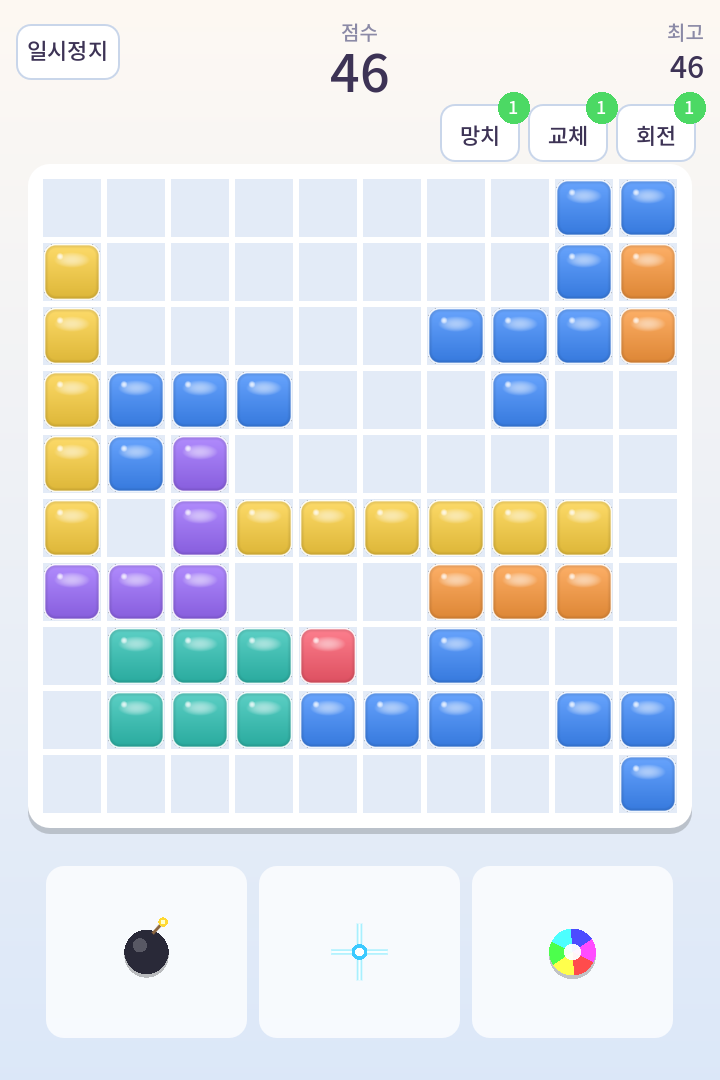
Three modes in one game: Fit, where you drag tray pieces onto the board; Gravity, where the direction things stack in keeps turning mid-game; and Drop, where pieces come down from the top. What is different is the skin — beyond five presets, you can drop eight photos of your own into the eight block colours. Watching lines clear on a board made of your own pictures is the point.
Play it here
Press the button and it runs inside this page. Nothing is downloaded until you do, so reading and leaving costs you nothing. No install, no sign-in.
Who it is for
People who have played block puzzles for years and are tired of somebody else's block art
What it does
- Fit: drag three tray pieces onto a 10×10 board. Rows and columns clear together, and it ends when nothing fits
- Gravity: pieces slide toward gravity and stack there, and every fifth piece the direction turns. Everything already on the board sweeps into the new direction, and any line that lands complete clears on the spot
- The gravity board is a 12×12 square. A tall board would make each direction a different game
- In gravity the lines that clear run perpendicular to gravity: horizontal when it pulls down, vertical when it pulls left. Lines parallel to the stacking direction almost never fill, so requiring those would mean a board that never empties
- Gravity input is taken in screen terms and translated into gravity terms. People move their hands by what they see, not by working out which axis gravity is on right now
- Drop: rotation with wall kicks, next-piece preview, hold, ghost, lock delay, back-to-back bonus, combos, perfect clears and a level curve
- The board was widened to 10×10. Rows are harder to close, but the extra intersections make it much easier to set up several lines for one placement
- Long straight pieces are handed out generously (a 1×6 was added). A ten-cell row never closes without them. Chunky 3×3 shapes were made rarer — they occupy space while contributing little to a row
- Three special blocks. The bomb clears 3×3, the laser clears the whole row and column it lands on, the rainbow clears every tile of the most common colour
- Specials are born from combos: bomb at three, laser at five, rainbow every third combo from eight. They arrive in the next refill rather than replacing the tray you were already planning around
- The laser is a cross because a one-cell piece has nowhere to draw a direction. A piece whose orientation you cannot read is a piece you cannot plan with
- Effects scale with how many lines went at once: more debris per line, a screen flash at three or more, and light sweeping along each cleared line
- The laser beam is drawn as an actual line rather than particles. Faking a straight line with particles reads as a row of rings, not as something that swept through
- Events: six in Fit (ice, gold, gust, frenzy, gift, bomb) and four in Drop (garbage, frenzy, bomb, slow)
- Three items — hammer, swap, rotate — one every four combos
- Five skin presets (candy, gem, neon, pixel, wood) plus rounded-corner and depth options
- Custom skin: your images go on the eight tiles, the background and the board. They are saved on the device and never uploaded
- The same seed always produces the same game. Even the seven-piece bag is shuffled by hand, because the language's own shuffle draws from a global generator and breaks that property
- Eighteen sound effects generated in code. The project ships zero image or audio files
- Touch and keyboard drive the same rules: swipe, tap and buttons alongside arrows, Z, X, Space and C
- The Android app gives you five stars: one is spent when a run starts and one comes back every five minutes. Watching an ad adds more with no cap — basic and ad stars sit in separate pools so the cap and the refill clock can apply to one and not the other
- Stars are counted on Android only. The web has no ads, so an empty star bar would leave waiting as the only way back
- The Android app carries a bottom banner and a rewarded ad. The space a banner will occupy is cleared before the banner appears, because the other order puts the banner over a button and turns that tap into an ad click
- Runs in the browser with no install
Where it is going
It began as a one-day build and now has three modes. The Fit board started at 8×8, and the direction changed once it was clear that the good moment in this format is not clearing a line but clearing several at once. Everything since has pushed that axis: a wider board, generous straight pieces, combos that produce special blocks, and effects that scale with the number of lines. What is still unknown is how many lines a human actually clears per game. A random bot cleared fewer after the board grew (1.2 to 1.0), but a bot does not aim for lines, so that number is only readable as the swing between two settings, never as an absolute. Next is long play sessions to settle the combo thresholds and event intervals, then an Android build and music.
Written while building it
Status
On Google Play
Google Play 프로덕션 검토를 통과해 2026년 10월 20일 공개 스토어 페이지가 열린 것을 확인했습니다(한국에서 확인). 이제 테스터가 아니어도 설치할 수 있고, 웹에서도 그대로 해 보실 수 있습니다.
- StartedSeptember 2026
Before you play
- In development: the numbers move often. Combo thresholds, special strength and event intervals are all provisional
- Fit is drag and drop; Drop takes swipes or the keyboard
- It makes sound. Browsers only allow audio after your first input
- High scores and skins live in the browser. Private windows and clearing site data lose them
- Photo skins stay on your device and are never uploaded
- Picking photos in the browser has not been verified on a real device yet
- The Android app is on Google Play
- The app has ads and a star limit. The browser version has neither
Links
Tried it?
Tell me what worked, what did not, or what broke. Feedback is read before it is published. The feedback page is in Korean.